Warcraft Fish Assistant(Or Fishbot, whatever you call)

Warcraft Fish Assistant
🎣Fishing skill upgrade
🌟Auto cast, auto pull.
⭐Pixel bot, no memory access.
🌟No game version limitaion ※It's not recommended to use on live server
⭐Multi-Monitor supported
⭐Exclusive version. Every copy got a unique file hash.
Test Video
HOLD ON, THIS IS VERY IMPORTANT.
There is an old saying in China “刑不可知,则威不可测”
Means "Punishment must remain unknown, so its deterrence is unfathomable."
The detection of third-party softwares by game BLZ is an opaque black box, and outsiders have no way of knowing how the BLZ detect and define "unauthorized third-party software."
Although this software does not modify or access any game files or memory, BUT, an unusual gameplay pattern can still be used as evidence for an account ban. Examples include:
- Logging in and doing nothing but fishing.
- The character is online all day doing nothing else but fishing.
- Extreme high fishing accuracy, continuously catching fish for several hours without missing.
All these behaviors can serve as grounds for a ban, so DO NOT use this software on BLZ live servers.
Download
👉Click to download👈System Requirements
- 64-bit Windows 10 or Windows 11 (x64 only; 32-bit systems are not supported)
- .NET 10 Desktop Runtime (x64)
Download .NET 10 Desktop Runtime for Windows x64
Activation Code
After payment, activation code will be sent to your email. If didnt, please check your spam, or contact contact@tinkerthat.com
Manual
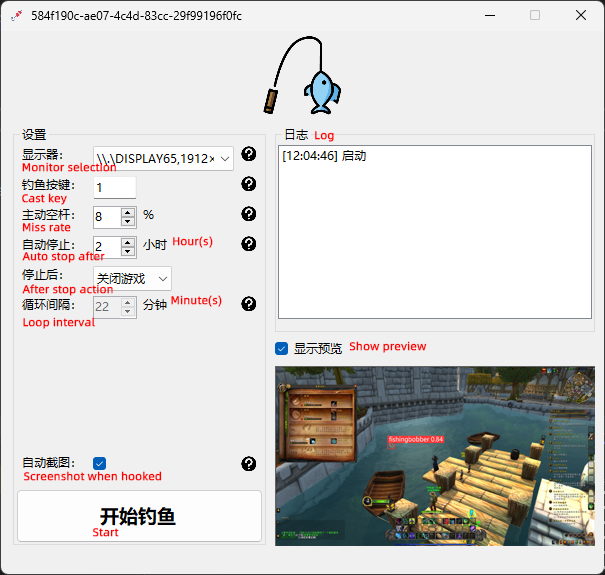
1.Since this software uses drivers to simulate mouse and keyboard inputs and to capture screen images, if you encounter issues like failed casting, inability to click on the bobber, or screen capture problems, try launching the software with administrator privileges.
2.Enable Outline Mode in the game: Go to Options -> Interface -> Outline Mode -> set to Quest Objectives and Mouse Hover. For Classic or Forver, use Classic mode instead.
3.Set up Auto-Loot. Game versions without auto-loot are not supported.
4.Avoid areas with hostile red-named mobs.
5.Adjust the game camera angle so that the bobber is fully visible. Do not zoom out too far and try to keep the background clean. Refer to the test video.
6.The game resolution should be 1920 × 1080 or higher, in either windowed or full-screen mode.
7.The game cannot be minimized.
8.If you have any other questions, feel free to reach out to contact@tinkerthat.com.
About lure
Live version
1 | /use [LURE] |
Classic version
1 | /equip [FISHING ROD] |
Q&A
Q: The second screen is not working properly, and the preview shows a black screen.
A: This usually happens on screens with scaling enabled. Start the software with administrator privileges, drag it to the second screen, select the second screen from the dropdown menu, start fishing, and then restart the software. It should work properly afterward.
Q: How to resolve the "Sys time error"?
A: The system time of your PC is incorrect. Enable "Set time automatically" or synchronize the system time over the internet.
Q: Windows Defender reports virus.
A: False positive. You can upload the file to virustotal for verification. Add the software to the exclusion list to resolve this issue.